Mobile App Analytics With Google Analytics Android App

Once you look at the number of people using their mobile phones for functions apart from the normal "calling", it doesn't strike a surprise that the handheld devices are really churning out the traffic. And with the interest the app developers are bombarding the mobile world with the different apps, the consumers (or users) are using these apps with as much comfort and interest as well.

Google Plus In Between The Updates

By now we are used to getting some nicely crafted updates from Google on their social network in a bid to get better for their web as well as smartphone users. So it isn't a surprise that we see updates to both version (web and mobile app) very often.

Cafe4tune: Social Network with 3D touch and Karaoke Options

Cafe4tune, founded in 2011 offers its users larger than life ways of interacting in 2D as well as 3D virtual environments. The environments that we talk about are in the site' lingo are called Cafes. You can design your Cafes as per your needs. You can create a profile for you (individual profiles) or there could well be organizations that can join the network.

ApnaCircle Launches New Profile

This new feature comes in after they launched their corporate site earlier this month. The look of the new profile is really exciting so we dive in for a treat straightaway without any delay :). We would have liked to capture the full profile look for you...

Facebook Beautifies Photos and Notifications

Facebook has started rolling out changes to its photos page on Timeline as well as on the notifications that you receive about your photo posts. As per our last update today, users have started seeing the changes on the notifications drop...

Social Media And Your Network

Social media is a bubble for whose existence we all (well, nearly all) agree with. If you think otherwise, we would love to hear your views on the Facebook-Instagram deal as detailed on our post the other day. Existence of this bubble makes us think of how cramp the bubble would be with so many things finally making it burst.

Tuesday, 31 July 2012

Gmail Chat gets Google+ Hangouts

It was way back in 2008 when Google introduced Gmail video chat option. And we all loved it! Especially when it was providing options to millions to stay in touch wherever they may be in terms of their geographical locations. Apparently that's what Google says it found out and thus wanted to improve on that. What they did? They bring for us the Google+ Hangouts that will replace the normal video chat option that we are so used to currently. Doesn't come as surprise? Know why? Read on...

Since the introduction of its social network, the search giant have really been trying hard to get Google+ kicking hard at the competition that it faces. And in the process Google seems to be integrating all its products into the social network. In it or around it!! So introduction of Google+ Hangouts in to GChat is not something we didn't see. The Hangouts have really got it going and by far is the most favored feature of Google+. So we really were sort of expecting the integration to come along. We totally agree on the step taken and believe that we are on same page with Google in expecting a kick in the usage and awareness of Google+; not that it hasn't been kicking up the competitors.

Unlike the old video chat, which was based on peer-to-peer technology, Hangouts utilize the power of Google’s network to deliver higher reliability and enhanced quality. You’ll be able to chat with all the same people you did before and, in fact, with Hangouts you’ll now be able to reach them not only when they are using Gmail but also if they are on Google+ in the browser or on their Android or iOS devices. 

Google made this announcement on the blog post. Google mentions in the post that all users will be able to benefit from this feature, but if both you and the person you are chatting with are on Google+ than you will be able to use all the benefits of Google+ Hangouts. The experiences mentioned were:
  • chat with up to 9 people at one time.
  • watch YouTube videos together   
  • collaborate on Google docs and share your screen too
and the hangout is fun when you can sport a virtual mustache or try a pirate hat!
P2P hmm; what's the thing that Skype uses in thier video chat again? ;)
The upgrade has already started for certain people and is expected to rollout to everyone in due course of a few weeks. Did you get it already,  why don't you share your experience in the comments section? In the meantime, here is a small video for you:

Monday, 30 July 2012

Google Calculator Goes Scientific

The search giant doesn't stop mesmerizing its users with sometimes out of the world things and sometimes some small updates that gets so useful for a day to day life. Like this one where Google gets to you faster with the math calculations that you would think. Google' calculator has gone scientific and right on the search results page. Interesting? Yes. Useful? Much!!
Google Calculator Goes Scientific
The 34 button calculator appears right above the search results as you perform some math related task. So while a few days back a "14 x 14" on the search bar on the Google search would have just popped up the results (that' 196 if anyone is interested) just as a favor for you on the top pf the other search results. It now provides you with a result with a calculator, as you see on the image left of you.

Also, if you have a mic visible to you on the search text box, you are very welcome to do a voice calculation and the result would be shown right as they do while you do a "typed" search. And (yes there is more), it would understand if you said, "cosine of X radians". Don't trust us? Go ahead try that out!

The search giant hasn't left behind the mobile browsers in this case. It works on our Android device and as well as for the Safari and iOS browsers. With the only problem on scientific keys (rather buttons) is that they don't appear unless you view the calculator in the landscape mode. Have a look on the view for both the portrait and landscape views:
Google Scientific Calculator on Mobile Browsers
    

Sunday, 29 July 2012

A Professional Facebook?

Facebook is a social media giant, we refer to them by that name; so its obvious that we do not doubt the fact that they are. Not at least in our minds! Yes we do agree that Google, the search giant, are on their way to do a catch up, but that should be a while before we start thinking of someone else. Arguable? Yes, and we agree. But its not the social aspect of the site that we are to discuss today. Its more on the professional way. Yes you heard us right ;). Threat to LinkedIn? Well, it could be considering the user base they have. We will discuss, read on...

Its heard(call it a rumor if you wish so) that Facebook is planning on introducing a job posting board in or around the 4th quarter this year. The jobs may not be directly posted on the site, but will be accumulated from third parties and thus would be available in results for the searches made the users on the site. There are 3 job posting companies that use Facebook' platform and are considered to be participating as and when the option opens up. The trio that we refer to are, BranchOut, Jobvite and Work4Labs. Its still not clear if the feature would be monitized or will be free at least for the start. It is being speculated that the feature is about driving user engagement on the site, well we aren't really sure of that ;)

Is this new offering going to be a threat to other sites, especially LinkedIn (LNKD)?

Demographic Difference
Sites like LinkedIn and Viadeo has a user base who are on the site for job hunting. They come to the site to interact looking for the professional network that their social media life has. And they would thus be for most of the user base, professionals who are already in their career build up phase or in the professional life for some good part of the past.
Facebook user base would be more on a teenage part or those who come to the site not for job hunting but for sharing their social life with the social network that they have on the site.

The Professional You!
For any head hunter, referring to profiles on LinkedIn, ApnaCircle or Viadeo has its advantages. The user profile in itself serves what we call the digital resume or the online resume for the user. The profile section on these sites have been designed keeping in mind the needs for both the job seekers and the recruiters.
Facebook will have the biggest challenge in this area once it starts to seriously think competing with them in this part. The user base may be 8 fold but the way the profiles are perceived is no way near the professional portals we mentioned here.

Recruiting versus the Advertising Platform
Recruiter Space
The moment we land on the respective sites for a purpose of perceiving them in one way o the other, you will see that most of us perceive Facebook as an advertising platform in terms of professional use (social too, yes).
The professional portals are known for their advertisement offerings for example Viadeo' Social Ads are a hit in France. But the initial perception is that of a recruiting platform. They have already had a start in that part. Big companies now heavily rely on this part of these professional sites. Facebook has a long way to cover in terms of perception at least!

The extra features like the Company Pages, Skills management are also a class apart for the professional portals. So although Facebook' user base has been an added advantage, LinkedIn, Viadeo and ApnaCircle are currently well placed from the recruiter space side. What do you think?

Post Credit: Gives him an entry to SocialCrunching Hall Of Crunchers

A graduate from Hindustan College of Arts and Science(HCAS), Chennai, India; Kanti has been a Marketing Trainee at RealBridge Marketing Pvt Ltd. Says he has his "own religion,wch reflects me,resides wthn me,,nd transparent" !
Connect with him either on Facebook or on LinkedIn for his professional life.

Friday, 27 July 2012

Jelly Bean Comes To Nexus S

We mentioned Jelly Bean enough in the last few months (including the Google I/O day 1 coverage) that the anticipation of it coming to someone' Nexus was building day by day especially after the announcement that we received of Jelly Bean OTA starting up. And we finally have it on our Nexus(es) and so we bring to you the much awaited hands on experience as we tried it out on our android devices. The OTA started around a week back with the official announcement from the Nexus stream on Google plus.

The First Impression
Jelly Bean Lock Screen Options
Its fast!! No doubt on that. Google and Android Development team seems to have done a far better job on this version as compared to the last ones. Project Butter is for now living up to its expectations and is delivering what was promised at the I/O. A fast, fluid and smooth experience that makes switching from one app to another a very beautiful experience, much thanks to the new animations that the team has provided with as you change the apps on the device or even withing the apps themselves. Triple buffering and vsync helps in smoother and more consistent rendering through the system. CPU gets a boost as soon as you start to touch the device and when not in use tries to saves battery.  


New Notification Bar
Jelly Bean Notifications Bar
 We saw some improvements with ICS, but this time its much more to comfort the user experience.  Bigger and smoother notifications.
Actions are now directly available from within the notification shade.
Grouping by applications with the first item expanded.
Pinch notifications to expand or collapse them.
Image preview is available after you capture a screen (power button and low volume at same time) and you can share the screen capture right from here!
Don't recognize the app that generated the notification? Touch and hold the notification to see app details.


New Camera App and Gallery View
Jelly Bean Filmstrip Mode
The camera app received some nice animations and a couple very useful features.
Swipe to view the recent pics taken without having to leave the camera app.
Pinch the photos in Gallery mode to create a filmstrip mode to view the photos. 
While in filmstrip mode swipe up n down to delete the photos and undo a delete in a touch.
New animation as you take a photo, Paging animation
Try switching your camera (front and back) ;)
Gallery animation while selecting a photo to view from an album.

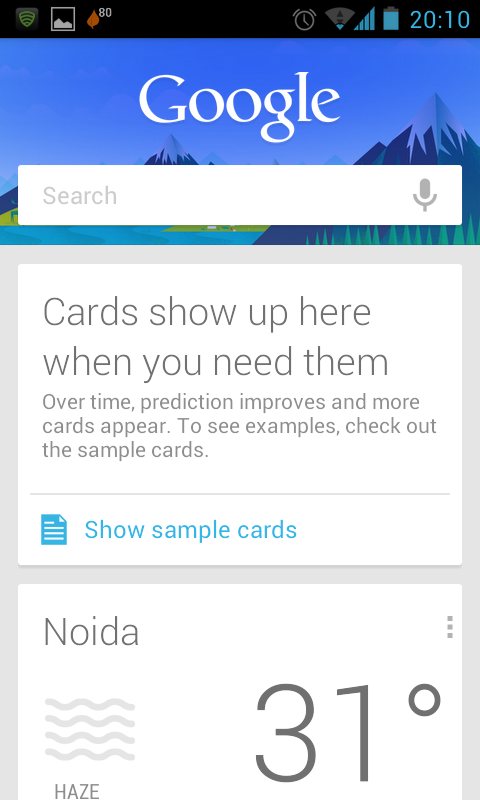
Google Now
Google Now
 Who said iGoogle is dying? Google Now provides a personalized experience to you once you are done configuring it. The data will be available to you via Google Cards and with time they get smarter to appear as and when you need them.
Weather card to show off the weather of your current location
Traffic card to get the traffic conditions and possible alternate routes
Flight card to get the flight details
Sports card to get  details on your favorite sports action
Translation card when you need to translate words while in a different region
Currency card for checking local currency conversion rates and etc.. 


Sir Alternate : Google Search (or Voice Search)
Jelly Bean Voice Search
We had our troubles with Siri and we are not against it. But having said that, Google seems to be taking the voice assistant from Apple a bit too seriously we think. They have a long way to go still but this really seems to be a start. When we tried Siri sometime back the accent was a real problem. Google' voice search seems to be picking us pretty smartly and presenting results in a very useful manner and reading out as well sometimes.
Uses Knowledge graph to make sure you get results pertinent to your needs and precise ones as well, a much richer experience.
Available from the locked screen by swiping upwards and otherwise by swping up fromo the taskbar/system bar.
While in Google Search (normal one) say 'Google' to activate the Voice search.
For some queries, like the one we did for The President, you may hear a spoken answer.
Much smooth and fast experince.
Feature to work better on weak network areas.

Text To Speech and Voice Typing 
Jelly Bean Text To Speech
Jelly Bean introduces conversational text to speech voice in US english for both network and embedded engines. The speech recognizer lets you type your mails and messages using voice and although Google says it works even when there is no internet connection, we found otherwise!!

Calendar Gets Animations and Colors and Notifications too! 
Its more buttery now with content fade and other animations on paging between days
Event colors are displayed if they were marked with one while creation.
Notifications show more details and with one touch you may snooze the event or mail all guests without going to the app
Emailing guests with either default messages like "Be there in 10 min" or your own custom ones.
Any setting son options that you do are now remembered by the Calendar app so you don't fret over the settings again an again.

Settings Got Accounts
Jelly Bean Settings
 The main settings now shows all the accounts that you have configured and are signed in on your device.

Internationalization and Keyboard
Jelly bean adds support for bidirectional text and adds more languages including Persian, Thai and Hindi with more Indic languages like Kannada, Telugu added.
Japanese specific version of glyphs are now properly rendered while using the language
Platform' dictionary gets more accurate and relevant
Over time predictions, corrections get better.
Language switch is easy and one touch
Keymaps for QWERTY, QWERTZ, AZERTY, Dvorak, Colemak and PC styles are avialable.
Input style switch with hotkeys is now available as well.

Messaging
MMS snaps show right thee in notifications
Recipients suggestions are improved as you compose a message and start tying sender' name
Msg delivered reports now sport the contacts name as well.

Did you receive the OTA on yours or are you on the manual install? Share with us on your experiences about this new version,  which seems will have an important part to play considering the issues that were raised with the previous version; ICS! 
Post Credit:

One of our regular readers and the one who suggested this topic first, Milind is a software engineer by profession and is himself a blogger. You may follow his life events on his blog All in a day
Connect with him either on Facebook or on ApnaCircle for his professional life.

Tuesday, 24 July 2012

Cafe4tune: Social Network with 3D touch and Karaoke Options

Till now in our journey we have covered both social and professional networks so this shouldn't be any different or is it? Cafe4tune is a social network which like others is free to join, but that's obviously is not why we are covering this one. What makes it different from others is the features that they offer to their users. Read on and you will know why and what!

Cafe4tune, founded in 2011 offers its users larger than life ways of interacting in 2D as well as 3D virtual environments. The environments that we talk about are in the site' lingo are called Cafes. You can design your Cafes as per your needs. You can create a profile for you (individual profiles) or there could well be organizations that can join the network. Once you
Cafe4tune Social Networking have registered and have a profile created, you are ready to take off in the Cafes. So for instance you may connect with other members, take part in cafe polls, add photos, join tables and may have group chat with table members. There is option to create multiple profiles if you wish from the same account and you are fee to switch from one to the other as and when you like. There are 2 tabs on your home page that can let you see news feed or updates from either your network or from the whole Cafe for instance so you can keep an eye on the latest news updates where ever they may come from. And you are free to speak your mind as you like ;)

For a list, here are a few hints of what you may do on the network:
  • see a 3D version of yourself as well as your surroundings
  • create online broadcasting for free, with live streams and participation in forums and polls
  • option for chat and video conferencing
  • add, view photos and video albums
Apart from this for those interested there is an option for online dating as well. The site provides with an option of secure online dating service. The company states that their algos in place provides for a cross matching results to select profiles that will suit you best. Initially you will share only some fundamental things but once you feel comfortable with your match will the system allow for further development on the network. The privacy is well taken care of and that there are options that should suit everybody on lines of categorizing your relationships. Some examples would be: relatives, classmates, friends and acquaintances etc...

They also have their smartphone apps available for iPhone and Android. The apps are developed using WebGL technology. When you browse the virtual world in 3D, it creates the experience like you are in a game. Switching to normal mode is quick and fast.

They recently launched a new service on the site called Karaoke and also a new game called the Coffee Man. 
Cafe4tuune 3D Karaoke
Karaoke is offered both in the online and offline modes. Users of the site are allowed to record their offline Karaoke and then upload them on their profiles. They can then share them with whoever they wish to. However if you wish to perform a live Karaoke in front of an audience then the site has that option open for you.You can sing online and your performance will be live streamed to others. If you are more of a lending-your-ear-type then just join a Cafe, go to Karaoke section and listen. For those who may want to sing themselves, once you are in the section just select your preferred song and wait for your turn.
Cafe4tune Coffee Man
In Coffee Man, the users will try to race against time as they compete to serve the people with their choice of beverages. The game becomes more challenging as you will have to make sure to please all the customers who have their hands in search of their drink and hate to be kept waited. You score positives if you serve customers on time, while you loose points if customers are let to go without being served correctly. For advancing to next step you will need to score some minimum points while in a particular level.

Cafe4tune Virtual Elections
A few weeks back they also introduced a new feature called the Virtual Elections. The feature allows the Members of the site in any country to participate in democratic elections which are (of course) virtual in nature. Members can choose their leaders whom they want should win a particular election. The countries, leaders, communities are all virtual and are only confined within the social network. Members can nominate and candidate for the elections, interact, discuss among themselves and also caste their votes for the virtual leaders in the elections. So a Member is free to nominate himself or herself for a position for which the elections are staged. The best example of elections are the Presidential elections that were underway in India recently and we had a Virtual election on the Cafe4tune site.
 
Post Credit

Ripple Links is a dynamic full-service demand generation and social media management company. The company provides a unique bouquet of services that helps you devise an eco-system to identify targeted stakeholders, enable swift engagement, minimize turnaround times, thereby strengthening your sales and marketing engine.
If you wish to contact their team, click here, or follow them on their blog here

Monday, 23 July 2012

Blogger : Custom Permalinks For Posts

W covered the news when earlier this year Google made some SEO specific updates to its blogging service, Blogger. The changes included :
  • the Meta description option
  • a custom 404 page
  • the custom robots.txt
  • a way to include alt and title tags to your post images 
  • a way to mark a link as nofollow
to name a few. That made things simple for bloggers or otherwise they were producing pages that weren't that much on the SEO compliance level and also a way to customize some parts like the robots.txt for example. In turn it made things easily indexed in search engines.

The changes were good and effective and required to be precise, but there was one important area that bloggers were always restricted with. You could dive in with a perfect post content, but had to deal with irregularities sometimes when you wanted the post title to be something  descriptive but at the same time not cut short the post url in to something that was useless from a custom search perspective. If you are with us on this, Google finally made things easier. So no longer are you required to make a hack or use any tips and tricks from anywhere.

So until now we the "bloggers had no control over the" url of the post that was constructed
Automatic Permalink in Blogger
by Blogger service automatically based on the title you gave to the post. The post url or the permalink was there to be dealt with and was permanent without any customization to it. Not so now!

"Custom permalinks give you more control of your blog and posts. These new custom links also provide readers with more information about your post when scanning search results."

The option to the permalink would be available in the right side bar on the post editor for blogger, under the Post Settings; just as the image above. The custom art of the permalink would be only the part that Blogger usually stuffs youur post title in, like for example for this post:
http://www.socialcrunching.in/2012/07/blogger-custom-permalinks-for-posts.html 
The bold part in the URL above is what actually is the custom part in the permalink. 

 While you choose the custom url for the permalink, you will need to select the "Custom URL" option as shown in the image on the left. Then just type what suits your post in the text box. As you type Blogger will try to provide you with the preview of the permalink. In case the permalink that you are trying to create already exists, logger will try to suggest you with whatever free alternatives it may find. 

"At present, the characters allowed in a custom URL are limited to: a-z, A-Z, 0-1. The only special characters available are underscore, dash, and period." So obviously spaces are not allowed as some of you may think.

For more information on news and relative links, you may head over here.


Friday, 20 July 2012

Divorced LinkedIn Gets a Facelift

A couple of weeks before Twitter cut out the partnering source line that allowed users to sync updates from one site to another. Thus ending the near 3yr association between the two. Although LinkedIn users will still be able to post and share their contents on their Twitter accounts by the click of a button, the reverse will no longer be possible. The announcement came via an official blog post from their head of product content, Ryan Roslansky. The reasons of the one way divorce are unclear but if you use internet daily and keep an eye on these social media news, it wouldn't take more than a couple minutes to make the best guess ;)
At the back of this one way divorce with the micro blogging service and the Member privacy issues, LinkedIn made a very unusual but very welcome changes to its site. The revamp gives the site a complete facelift as far as the home page is concerned. The all white scene is now history and a new black and greyish look is here. The header floats with you as you as you scroll the page down, a little like the ApnaCircle header updates, but while they had the company logo shifting to the left and only the menu part floating with the window scroll; LinkedIn chose to go the easy way having the whole header as floating. The color contrast they chose looks good unless you see the ad with a white background sitting right at the top of the page, just beneath the menu bar. Didn't understand the design there.

You also see a drop option just besides the search box at the right of menu. This drop tells you on which section of the site you are on. So while it says People in the above screen shot, it means that we are on the main posts page that shows us the news updates from our contacts. The moment you go to LinkedIn Today you will see it change to Updates. However, if you try and change the drop down value manually, the cursor will take you to the search box on its right. So if I change it to company, the system understands that I am trying to search for company and puts inside the search box ready to accept my keywords and wait for me to hit Enter. Sounds a bit awkward to us, or is it? Company' Product Manager Caroline Gaffney had this to say on the new changes:
"We've revamped the entire home page experience with a new look and feel to make it easier to scan and find the information that matters most to you," she also added; "This simpler and cleaner design makes it easier to navigate the page and quickly find the updates you're looking for."

Apart from the Home page, the LinkedIn Today added a few "social gestures" viz the Like, Comment and Share giving it more of a Facebook like feel!
You now can in fact follow the Trending articles and see what you are following and other suggested articles. The LinkedIn Today page, as shown above, explains the new changes and the social gestures that it got in this new revamp that the site has got after a long time.
     
Post Credit

A graduate from Hindustan College of Arts and Science(HCAS), Chennai, India; Kanti has been a Marketing Trainee at RealBridge Marketing Pvt Ltd. Says he has his "own religion,wch reflects me,resides wthn me,,nd transparent" !
Connect with him either on Facebook or on LinkedIn for his professional life.


If you want to share some news with us or want us to write about it let us know. Click here

X