Mobile App Analytics With Google Analytics Android App

Once you look at the number of people using their mobile phones for functions apart from the normal "calling", it doesn't strike a surprise that the handheld devices are really churning out the traffic. And with the interest the app developers are bombarding the mobile world with the different apps, the consumers (or users) are using these apps with as much comfort and interest as well.

Google Plus In Between The Updates

By now we are used to getting some nicely crafted updates from Google on their social network in a bid to get better for their web as well as smartphone users. So it isn't a surprise that we see updates to both version (web and mobile app) very often.

Cafe4tune: Social Network with 3D touch and Karaoke Options

Cafe4tune, founded in 2011 offers its users larger than life ways of interacting in 2D as well as 3D virtual environments. The environments that we talk about are in the site' lingo are called Cafes. You can design your Cafes as per your needs. You can create a profile for you (individual profiles) or there could well be organizations that can join the network.

ApnaCircle Launches New Profile

This new feature comes in after they launched their corporate site earlier this month. The look of the new profile is really exciting so we dive in for a treat straightaway without any delay :). We would have liked to capture the full profile look for you...

Facebook Beautifies Photos and Notifications

Facebook has started rolling out changes to its photos page on Timeline as well as on the notifications that you receive about your photo posts. As per our last update today, users have started seeing the changes on the notifications drop...

Social Media And Your Network

Social media is a bubble for whose existence we all (well, nearly all) agree with. If you think otherwise, we would love to hear your views on the Facebook-Instagram deal as detailed on our post the other day. Existence of this bubble makes us think of how cramp the bubble would be with so many things finally making it burst.

Sunday, 15 July 2012

Digg Sold Out: Reasons & Path Ahead

Earlier this year when Washington Post Company hired some 15 engineers from the site for some of its own social product development, it was only a matter of time till we heard Digg getting acquired. The news finally came out that Betaworks, better known for its services like bit.ly and news.me, has acquired Digg.com and the rumor was that the deal was closed for an eyebrow raising amount of $500K. Although as Digg' current CEO Matt Williams told AllThingsD, "the overall consideration is significantly larger" and includes both cash and equity. 

Matt Williams will be on the CEO position till the transition is over after which Betaworks founder John Borthwick will takeover as the new CEO of Digg. Since its launch around 8yrs ago, Digg accumulated around 350M Diggs, 28M Story Submissions and 40M Comments. So why a sold out for a company which promised more than we have seen in the past 2 yrs? According to Matt they "considered many options of where Digg could go, and frankly many of them could not live up to the reason Digg was invented in the first place — to discover the best stuff on the web. We wanted to find a way to take Digg back to its startup roots".

It sure looks like that the company really thought they lost they way. Looking to do a makeover in between the users, Digg made a revamp with the version 4.0 update that the site provided its users with in the summer of 2010. The update, dubbed as the 'new Digg', faced more challenges than ever. Poor reception, decreasing traffic made it difficult in the time of layoffs and some management changes. Soon after company' co-founder Kevin Rose left the company. He joined Google when the search giant acquired his latest startup Milk.

Digg raised a total of $45Mn in a series of fund raising roundups since its start. With one of the fund raising totaling around $5Mn, which closed last year, was said to have saved the company in tough times. Its reported without this fund raiser Digg wasn't going to last more than six months as far as the financial terms were concerned. The recent developments in the social networks raised a lot of competition for the company with users shifting their base to Facebook and Twitter; while preferring other similar sites to Digg Stumbleupon, Reddit etc also making it tough for them.

Betaworks, in the meantime seems to have plans laid out for the future of the service. The existing employees may not be moving over but its reported that the news.me team will be taking over the complete management of the site. The plans are also to turn "Digg back into a startup. Low budget, small team, fast cycles". News.me is a mobile first social news experience and the team will try to take Digg site back to its essence and revive the feature that the site was initially found for "the best place to find, read and share the stories the internet is talking about". Digg' new CEO John Borthwick said that they are "going to build Digg for 2012", suggesting some exciting news in the near future for the site and its service for users.
        

Friday, 13 July 2012

Google Plus In Between The Updates

Before we start, a sincere thanks to all our readers as we complete a round of 100 posts. Yes, this is our 100th post and you all deserve a big thanks. Our Crunchers are still shining bright on the Hall of Crunchers page and we already have our first Cruncher of the Month. A very big Thank you to everyone who made it possible that we could be 100 posts old. Please keep it going!  

By now we are used to getting some nicely crafted updates from Google on their social network in a bid to get better for their web as well as smartphone users. So it isn't a surprise that we see updates to both version (web and mobile app) very often. We may cover up on the smartphone app updates in another post but this time we point out a few things that might have skipped your mouse and eyes but certainly caught the eye of one of the platform users, refer to the Post Credits section at the end of this post to know her and we strongly recommend you add her to your respective circles; we just love her posts!
   Control How much you see on your stream
Google plus Control Stream
 Should be a pretty simple thing for the normal users but if you are new to the social network this might be the first thing (or the second ;) ) you worry about once you start settling down in there. And you would be happy to see that there is an option to do that.
From your Home page (the main stream page), click on the any of your circle tab from the tabs that sit above the share box. Once you are on a Circle stream, you should see a slider on the right side of the page via which you can control the stream flow. The four options would be: Show nothing, Show fewer things, Show most of the things and Show everything from this circle in your All stream page.

Change Circles that show up on the main stream page
Right over the share box on your stream page (Google plus Home Page/Tab from the ribbon menu) you always see 4 tabs; All, two of your Circles and More tab. If you want to customize which two tabs you show there, its easy. Just head over to your Circles page. At the bottom half where it shows all your Circles, just drag the two you want to show as the tabs on the Home page and pull them as the first two from the left. A bit like this:
Google Plus Choose Circles Mystery of search and Google Plus Pages
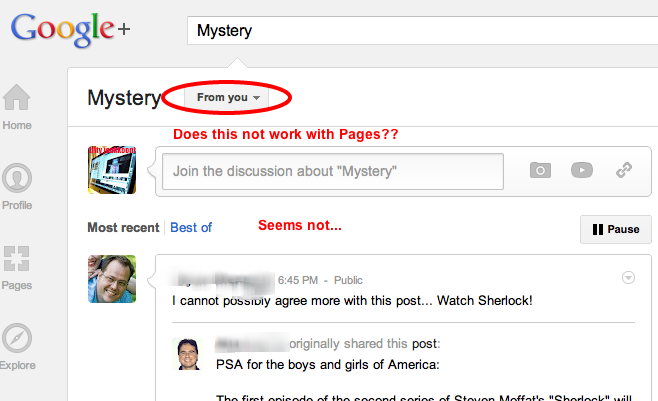
The search with Google plus seems to be a mystery sometimes. If you want to search a page for your posts, type in the search term and then on the search page, right at the top, drop the options to filter out the results. Choose From You to see if you can pull up the related posts posted by you. Mystery, yes! Seems some people haven't had the results they intented.
Google plus Search
[Image Credit: Jaana Nyström]
   
Find your own posts, can you?
While you may have your opinion on this one. But this post from Jaana Nyströmcreated a few other options that people use to make sue they don't loose out on their own posts. One very common would be to use the hashtags. One other interesting option was to use an empty circle and make sure you always include it when you post something. We leave you to decide how you do it, we don't mind you sharing with us on your preferred way. But if you are not tin the mood to use our comments section, follow this post here.

Thumbnails and Cover photo banner, switch back?
We have had a couple people complain us on this one. Since the introduction to the cover photos, Google seems to have put the decision in jeopardy. And that is because they switch to cover photo is irreversible. So if you are using the five individual photo option and want to switch to the new cover photo option, please make up your mind as you will not be able to revert this one back.
Follow this post here to keep an eye if anyone has any news on weather there is any option somewhere hidden. So far no clues but hey Google did listen to this problem and here is what they reason the change with. Think there is really no going back :(
  
Circle adds and you keep searching
Certainly for people as famous as Jaana Nyström herself, you got to be in this issue sometime and every time. But really this is a real problem. When there are quite a few people adding you to their Circles, "you get a list and at the end you get a bunch of people". Clicking on the view button to see all who added yourself will take you to a Added You page where you can only see who added you but you possibly can't add them back. Also as she points out in the image below the number also gets changing which makes the interface that much hard to be simple and usable. Click on the image and follow her post for more updates and discussions.
Circle Add Notifications

Notifications gets better
Google Plus Notifications Options
 This is apart from the above covered topic of course ;). It seems Google introduced a few more options in the notifications feature. Now you can view all your mentions and plus 1's and photos too. Just click on the View all notifications link from your notification box and you will see the new features in the More drop there. More details and discussions on the post here.

Post Credit

Living in Jyväskylä, Finland Jaana has visited about 450 destinations in 46 countries. She used to work as a tour guide in several countries for 8 years absorbing history and present day culture, then as a production manager in a leading travel agency. A verified profile on Google social network she is a Google+ enthusiast, writer, blogger, consultant.
Circle her either on Google Plus to keep up to date with her discoveries on the social network and life in general!

Wednesday, 11 July 2012

Jelly Bean Rolling Out To Nexus Devices

Jelly Bean Rolling out for Nexus devices

So our prediction of Jelly Bean availability wasn't that much off target anyway. Although at the Google I/O 2012 Google promised they will start the roll-out of Jelly Bean from mid July, it seems the search giant were excited more than the users. After the release of the source code for Jelly Bean a couple of days before, Google has started the roll-out of Android version 4.1.1 (aka Jelly Bean) from yesterday.
Jelly Bean OTA Available

The news was made official via the Nexus page on Google plus. For a start the OTA(Over The Air) would come to the HSPA+ Galaxy Nexus. So if you are the proud owner of a HSPA+ Galaxy Nexus, the update should be available to your device in the coming days. Running the stock Yakju or Takju build on your HSPA+ Galaxy Nexus? Well, it's time you go to Settings-->About-->System updates and check if there would be one available right away for yours. Don't worry if you are running the developer version of Jelly Bean shown at this year's Google I/O, since the version currently available as an OTA is a newer version than the developer so you will be getting the update over the air and pretty soon too!

The update, once you have it, will provide you with all the features of Jelly Bean that were shown at the Google I/O 2012; which of course includes Google Now; improved notifications & home screen; new keyboard and improved camera app; and yes Project Butter would be available for testing as well :). The word is doing the rounds that although Nexus 7 would soon start shipping with Jelly Bean (4.1.1) but if you already have the tablet with you, the update would be round the corner. The 4.1.1 build via OTA for Nexus 7 will also include the Google Wallet service. You may head over here to get more details on the features of Jelly Bean.

Apart from the unlocked(not tied to carrier) Galaxy Nexus, the post from Nexus page says that jelly Bean will next be available for download on "all Galaxy Nexus, Nexus S, Motorola Xoom and of course, Nexus 7, which will ship with Jelly Bean later this month" !! So stay tuned...

Once you have it don't forget to share with us the new features and your reaction on the new version of the sweet dishes' from Android. And we are waiting to hear how the Google Now' swipe-up motion turns out to be on your devices. Have fun tasting Jelly Bean :)


Tuesday, 10 July 2012

iGoogle Phase Out

"Last fall we started a spring clean, and since then we've closed or combined more than 30 products. Today we're announcing a few more closures" This is what Google global search GM Matt Eichner had to say on company' official blog. So its basically more than iGoogle has is seeing the end of the tunnel.
iGoogle will close on 1st Nov 2013
Search giant has announced they will be closing out a few of its products that include iGoogle, Google mini, Google Video and Chatback and possibly the Symbian search app. If you love any of these products, you will have time till end of 2013 to gather yourself and find whatever alternatives you may settle on as a replacement. These services, Google said, will be closed in a phased manner. However the mobile version of iGoogle will be closed out at the end of this month.

This is part of the housecleaning that we are now used to see the search giant indulge in, especially after the introduction of Larry Page as the CEO of the company. Since his introduction some 15 months back, the company citing periodic housecleaning work has closed out nearly 30 products.

iGoogle was introduced some 8yrs before as a personalization service from Google. The service allowed users to personalize their home page with themes available in the tool and to have applications like weather update and stock news based on their usability. Google gave a way for its users to return back and to use the information they cared about and more importantly with ease! And since it was only available to the logged in users, Google gained some user count from there as well. But as time has changed and other services are available "The need for iGoogle has eroded over time" said Matt. Which we agree is true. With the advent of smartphones and number of apps available a user would normally refer t his smartphone home screen for weather and stock updates rather than go to iGoogle. iGoogle with its unique features, when started, became one of Google' fastest growing service around 2007, nearly 2yrs after it was initially started.

Will you be missing the personalized home page? Feeling sad or you think it makes no sense to keep the service, let us know!
      

Monday, 9 July 2012

Twitter Updates Search Interface

Twitter finally decided on making its search interface more user friendly and more sensible. The changes are not going to 'blow up' anything but they are what user today expects most of the time when they start typing in a text box on a page. And if there is anything to go by the one of the Tweets from Twitter' Pankaj Gupta, who runs the company's Personalization and Recommend systems, there may be more than what meets the eye. He hinted that the improvements to the search and discovery tools will dramatically change the service. Have a look at Pankaj' tweet for yourself!

The changes as Twitter users will agree, were long overdue. Especially since sending out information to Twitter, like we do, with our Tweets and RTs and other hashtags; we expect the system to be smart enough to know our interest and engagement graphs, like we saw with Smart News on ApnaCircle. Previously users had every right to say the opposite, not from now on. By the way if you are still wondering what type of changes we are talking about, you surely need to read on.

New Search Suggestions on TwitterThere is a big improvement on search via which you get the search suggestions based on what you are typing at that moment. The big change as users would agree is the Google alike, auto-completions of your search terms. Once you start typing in the search box you can see suggestions based on the user tweets as well as the matching in the user ids. SO for example if you are particularly interested in following a thread that is already making waves based on the hashtags contained in it, you will have it easy with these new search improvements. The search suggestions feature and the 'People You Follow' search results follow a series of small updates that include related query suggestions, spell corrections and relevancy in the search results; thus helping the users get close to what they find more relevant based on their search keywords.

The other updates included Google like spell corrections, where a misspelled word will yield the results based on the actual query that you initially expected to do. And again, you will also see related (and relevant) results if your search term happens to the one which has been doing the rounds in more than one way. The new search will also distinguish between the real names and the usernames. So if you searched word matches with a user name and also a person with a real name containing the term, this time you will see both results being returned to you. The search now gets smart in the sense that it also takes in to account the news shared by the people you follow. So while you may see top trending results from the discovery, the search will also have what your network tweeted on the same topic. Going deeper in to the archives may still be bumpy, but hey; Twitter never claimed themselves as a god archived service. Just change you browser address if you are to take a turn in to the history!
Twitter Search Updates

And just to make it more fun, the same updates to the search functions are also available on the smartphone apps, both Android and iOS. SO go now and update or download your devices respective apps and have fun.  
Post Credit

A graduate from Hindustan College of Arts and Science(HCAS), Chennai, India; Kanti is currently stationed as a Marketing Trainee with India' leading Career and Business networking site; ApnaCircle.com. Says he has his "own religion,wch reflects me,resides wthn me,,nd transparent" !
Connect with him either on Facebook or on ApnaCircle for his professional life.

Wednesday, 4 July 2012

ApnaCircle Launches Company Pages

A few weeks before we reported the 'coming soon' of the Company Pages on Viadeo group sites. They did keep their promise of launching the feature at the start of July. We now see quite a few Company pages on ApnaCircle.com, and so here we are with details on the feature.

For a start the feature is currently in beta version and it seems is under observation as the site doesn't really go on a promotion spree for the moment. We don't see any notification on Dashboard of the site about the feature being available for users to use. Another thing that surprised us is the news feed settings that has been kept very secretly under the options on your 'My network' tab on Dashboard. The feature is really interesting from the market competition and long term point of view for the site so we would rather have them shout at the top of their voice from the top of the building than just release the feature as quietly as they did. So for you to try feature, here is the link on the site to Company's Home Page which sort of found a strange parent in the Search option in the menu bar. 
 AnaCircle Company Pages Settings
The Company option seems disabled by default so make sure you enable it so you can start seeing the feed from the Company pages on your Dashboard.

The Companies Home Page looks like this:
ApnaCircle Launches Company Pages

The Beta is pretty much visible as you can see. The page displays Companies based on:
  • who is hiring
  • those who are near your location
  • those who has anyone from your network as their employees 
By default the All tab is what provides you with the listing. If you need any specific filter just choose the other tabs and the listing gets refreshed based on what you chose. Unlike the new profile page tabs, in here the listing of companies is refreshed without a page load which suits the user preference and from a performance point of view seems fast based on the data we had. As you see for the first company (that also happens to be Viadeo), when you click on the 'x in your network' that displays in the Company box, you get the view of who actually from your network is part of that Company. Hovering over the image provides you with the name like it is for Nicolas in above image and clicking on the image will take you to the respective profile page.

The search also provides you with suggestions as soon as you start typing in the search box. The suggestions don't include as much data as we would like to see, since otherwise with the present view, it looks a bit empty and seems to be missing some information. This is what we saw when we searched for ApnaCircle:
Search Company Pages on ApnaCircle
The Companies detail page has quite a lot of details for you to get in to. The top of the page has a Company logo; its details which also opens up a detail pop up as you click the more link; the count of people following it and the number of people in your network who work in this company; different links like for Twitter profile, company's site and if available their wikipedia page; a button for you to follow the Company and share on ApnaCircle, Twitter or Facebook as you like. 
Viadeo Company page Top
Unfortunately we saw an error while trying to share on the page on Facebook:
Company Pages oon ApnaCircle: FB Share Error

The rest of the details are divided in to tabs and we take a look in to them in details one by one. The first one is the Panorama:
Viadeo Company Page Panorama
The Viadeo Live and the 'They work at Viadeo' scrolls both sides to reveal the extra details that are hidden. The Live feed is very interesting as it provides you with the latest happenings inside the Company.

The employees listing is a very important feature and we would love to see a dedicated page for employees belonging to a company. You can, as it may be obvious, go to a particular employees profile view from here. The employees details depicted here also provide the approximate period the person has been working with the company. You may also send a connection request to any of these employees directly from this page. Just hover over the employee details and you will see a 'Add' link besides a 'View Profile' link. Clicking on the 'Add' link will open the connection request pop up that you are already familiar with on the site. 

On the right panel you will see a couple of profiles whom you can contact in case you need any details about the company. There is an option to directly send a message to the contact via the 'Send a message' link. The rest of the right side panel shows the profiles that are most viewed of the employees of this company. The top trending discussion make their presence on the center of the page here. This is a place to join the hot and most current topics on the site. The bottom of the page is again very obvious but important data. You will see the most viewed and other companies viewed by users.

The second tab will contain the details on the Jobs and Career on the Company. For a view on the inside of the Company and any career opportunities, you will need tot refer to this tab details. And you will see a couple of very interesting and innovative things here.
Viadeo Company Jobs and Career details
The start of the details here are interesting and you can see a few of the testimonials provided by the employees of the Company. Just click on the employees pictures under 'Our team and you' to reveal the testimonial provided by the employee. Although we liked this, but it was hard to understand the 'you' here. We saw our picture on the right with a 'And you?' there, really not sure what and why this was included!

A list of few employees follows again that should have been omitted as the same info was already aware on the Panorama tab. They seem left alone here! What follows is the essence on the information. Job offers will provide you with details on any openings in the company. Click on the job offer title or the link on the right side and you will be taken to the job offer details page where you can see full details on the opening as well as details on how to apply for the same.

The right side panel in here has videos from the Company. May be a link to the Company' YouTube channel would have made a lot of sense here. We were greeted with a lot of french content here although the our profile uses English as the preferred language. Join the conversion again includes the same data as on the Panorama tab.

The bottom of the page has some space for some pics that the Company may put and we see some SoundCloud usage here. We played the audio which seems to be in French and by the CEO if Viadeo, Dan Serfaty. You could see details from the info link on the extreme right side. The bottom of this audio bar seems to include the comments made by people on the audio that was uploaded on SoundCloud. We loved the inclusion apart from the fact that the comments as we see as we mouse over the small pics were in French.

The third tab titled Discussions is pretty much what you see in the Groups section. So the Company's main group may sit right here. We will leave you to explore the details here. Before we end the post here is a very nice video on the announcement of the feature:
Our Views:
The feature is both beneficial and interesting. Beneficial for ApnaCircle (and Viadeo Group), the Company whose page it will hold and site members to be able to see details about the Company. Currently there is no detail on whether the feature is paid or will get in to the premium version or not. ApnaCircle has done well to be able to launch the feature with so many companies both local and international. With the feature in beta we will keep an eye on it to see the improvements on some points:
  1. Announcement (some sort of notification) so Members would come to know of it.
  2. The error like FB share we reported here is not that we expect to be there on live site.
  3. Too much French content even when the viewing Member has an English profile.
  4. No YouTube channel integration like the SoundCloud link up.
  5. Search menu is certainly not the best place to put the link and why not in the footer?
  6. HCL Tech page says its headquartered in Noida, India; then why a Paris, France address?     
  7. Why does the Indian Railways page when viewed without logging in to the site shows the Viadeo header and Footer and with a French language while the company is Indian?
  8. Clicking on the Company name in the search box suggestion shows error with an orange layer popping up before the page goes to the Company' page. 

Tuesday, 3 July 2012

Mobile App Analytics With Google Analytics Android App

Once you look at the number of people using their mobile phones for functions apart from the normal "calling", it doesn't strike a surprise that the handheld devices are really churning out the traffic. And with the interest the app developers are bombarding the mobile world with the different apps, the consumers (or users) are using these apps with as much comfort and interest as well. It thus becomes not just customary but important that you track your users and study their behavior for the likes and dislikes they may have. If you are a user it may not be of much interest, but if you are on the other side as a provider or the app developer; there are a couple of very nice and important things Google did for you in a span of 4 days. 

Google launched the Mobile app Analytics (in Beta) a few days back. The new set of reports will help app developers measure their app usage and interaction in a more easy way and better way. The reports are tailored to suit the developers and marketers making sure they get the data that really matters from an analysis perspective. With these reports one can now see the whole start to end of the user interaction with the app viz, how they found the app, the download leads and the whole interaction with the app. The mobile app Analytics reports have a new layout as seen below:
Mobile App Analytics new Layout
Track new users and the sources they come from, which provides you (the app developer) with the important information of where your app gets its new users from. With the same report you will be able to analyze the interaction from your active users as well. The idea of this report is for a complete analysis of where the app developer will need to focus more on as far as the acquisition of new users is concerned and more because you will be able to know what your existing users may be looking for in the app. This information in turn will help app developers improve upon, innovate and fine tune on their marketing initiatives.  
User interaction and Acquisition
The app version distribution of the app users will help you analyze and decide which on to support. The device models information will be a good way to know which devices and OSes you app gets accessed on so you can focus on the optimization for making the browsing experience on them more better.

The engagement level of your users with the app will help provide you with a great deal of knowledge about how loyal your app users are and to what extent they interact with the app. You will be able to see and analyze the path funnel, through the screens and actions, that your users take to travel or navigate through your app. In fact you will be able to track down on the crashes of your app system and the system exceptions that may be generated.
User engagement reports
Apart from the normal interaction tracking, the most important tracking that a  marketer gets interested in is the conversion. This ultimately is the goal of the app. Track these from the Goal conversion as you set up the conversion events. Even if you are selling any tangible or intangible things through the app, you can always measure the purchases and revenue generation through these new reports.

And the best way to use these reports would have been a mobile app. And here it is, Google again got the timing right. They released the Android app for Analytics. The app is free in play store so feel free to get it today. If you need more details on the reports follow here.
[Image Credit: Google Analytics Blog]


If you want to share some news with us or want us to write about it let us know. Click here

X