Mobile App Analytics With Google Analytics Android App

Once you look at the number of people using their mobile phones for functions apart from the normal "calling", it doesn't strike a surprise that the handheld devices are really churning out the traffic. And with the interest the app developers are bombarding the mobile world with the different apps, the consumers (or users) are using these apps with as much comfort and interest as well.

Google Plus In Between The Updates

By now we are used to getting some nicely crafted updates from Google on their social network in a bid to get better for their web as well as smartphone users. So it isn't a surprise that we see updates to both version (web and mobile app) very often.

Cafe4tune: Social Network with 3D touch and Karaoke Options

Cafe4tune, founded in 2011 offers its users larger than life ways of interacting in 2D as well as 3D virtual environments. The environments that we talk about are in the site' lingo are called Cafes. You can design your Cafes as per your needs. You can create a profile for you (individual profiles) or there could well be organizations that can join the network.

ApnaCircle Launches New Profile

This new feature comes in after they launched their corporate site earlier this month. The look of the new profile is really exciting so we dive in for a treat straightaway without any delay :). We would have liked to capture the full profile look for you...

Facebook Beautifies Photos and Notifications

Facebook has started rolling out changes to its photos page on Timeline as well as on the notifications that you receive about your photo posts. As per our last update today, users have started seeing the changes on the notifications drop...

Social Media And Your Network

Social media is a bubble for whose existence we all (well, nearly all) agree with. If you think otherwise, we would love to hear your views on the Facebook-Instagram deal as detailed on our post the other day. Existence of this bubble makes us think of how cramp the bubble would be with so many things finally making it burst.

Tuesday, 4 December 2012

Now Pinch-to-Zoom on Android Gmail

May be easy to have missed features but Google just updated the Gmail app for Android with a few very handy and useful features that we were surprised took to 4.2 version of Android to be rolled out. These features were shipped with the current Jelly Bean (Android 4.2) version but now the Gmail Android app has been updated so users with 4.0 (ICS) and above and also use the features on their respective devices.

The Gmail app for Android version-ed at 4.2.1 was released yesterday in the Play Store, making it easier for the users to zoom the mails, archive and/or delete them with just a swipe and (most useful maybe) attach pictures and videos right from within the app. The features(especially the pinch-to-zoom) are not enabled by default and you will need to go to the General Settings for the app (and not the specific settings for a account that you use on the app) to enable them.

Mail Archiving and Deletion
The settings for this are at: Settings > General settings > Swiping conversation list if you prefer to delete from the inbox
All you need is start swiping your fingers either left of right on a particular mail item and they get archived (default setting). Option to undo the action is also available.

Mail Archiving and Deletion

Pinch-To-Zoom and Mail Re-size
The mail re-size option comes in handy, especially when the mail gets rusty on the edges or you have some images in the mail. The app now gets smarter and the mail gets re-sized as per your device's screen. The attachments or any pics in the mail are also displayed in larger sizes.

Even after this if you want to zoom in the mail, just pinch the screen while viewing the mail and zoom it like you do a normal pic.
Again, both these settings are not enabled by default, just head over to Settings > General Settings to enable them manually.

Attach Pics and Videos in the app itself
This is the best one. So while we used to choose the share option from any photo app to attach the pics in an email, the app now lets you attach your pics and videos right from within the compose window.

Attach Pics and Videos in the app itself
Apart from these for the pics that come to you as an attachment, just tap on the thumbnail to open it while you are in the view mode to open the pic in larger form and then you can swipe through the pics like you normally do while viewing them in a gallery.

Love the updates?Or got any problem with it, share with us in the comments.

Monday, 3 December 2012

Facebook Rolls Out Photo Sync

If you are already using Android phones, chances are you are already aware of the instant upload feature of Google Plus. Via this feature you are able to upload the photos taken from your handset directly to a private album marked as "Instant Upload" on your Google Plus account. The process is seamless and happens in the background without any interference from your side. The album is totally private and cannot be viewed unless of course you are the owner of the account. Once on the web you could choose to delete or share the photos you like as per your convenience and choice. Facebook has started to roll out the same feature on their Android and iOS devices app.

The details about the app feature are on their site for you to read in case you have any queries. For suing the feature, you will first need to enable it manually on the app. Chances are by now you should have the feature on your Android (and iOS) smart-phone. But if you haven't got it yet, you should have it sooner. To enable it manually just head over to the photos part of your account from your Android or iOS device and you should see a 3rd tab labelled, "Synced".

Facebook Rolls Out Photo Sync

You could take a look at the settings of the feature to make sure they are what you need. Especially since the feature has a upload-on-cellular-connection feature which may not be a good option for everybody. As you see here the feature is by default turned off and you will manually need to enable it. Our best option is to upload on WiFi connection.

Facebook Rolls Out Photo Sync

There is a size limit on the total photos that you can upload. The initial limit has been set at 2Gb so make sure you delete the photos that you may not want in the private album. Will the size be increased? Not work as of now from Facebook. On the sync timing Facebook mentioned that they will try to sync your phone gallery with your private album as soon as you take the photo but they will also take on the factors like your battery level in to account. As of the difference in the way(WiFi or Cellular) you choose to sync your photos on, Facebook has made it clear that the uploaded photos will be smaller in size (around 100K each) while using cellular network while using WiFi larger versions of your photos will be uploaded.

Do you think this is a threat to the Instant Upload feature that Google plus is already providing its users with?

Sunday, 2 December 2012

Samsung Launches Android Camera

Using a smartphone camera has its benefits. At least you are not required to carry two devices when you can do with one. But there are occasions you would need to have a actual camera, isn't it? Although certain people may not agree with smartphone vs actual camera thing ;)

Coming back to the camera topic. An actual camera is for every occasion and when the camera is an Android camera, that's an all added advantage. So after Nokia came up with the first ever Android powered camera, Samsung has now started selling an Android powered camera. The camera was launched last week and is now available in India also oat a price of Rs. 29,900.
Samsung Android Camera
 Nokia' Coolpix S800c which was launched with Android 2.3 (Gingerbread) was launched late August this year. Samsung has launched their piece on Jelly Bean, the latest version of Android flavor. The camera first launched in Berlin around August is now available in India and UK as well and as per Samsung it is to be called the Galaxy Camera which would allow users to take outstanding pictures and share them on social network at the same time.

The Galaxy Camera which has a 3G/4G and WiFi connectivity will let users share their photos without the need to connect the camera with any laptop or computer as such. The camera features a 4.8 LCD all touch screen and a 21x optical zoom. The Android Jelly Bean version used in the camera is 4.1 and it features around 30 editing tools to help your editing skills. It has a 308ppi pixel density and has a 1.4GHz quad core processor embedded inside.

Saturday, 1 December 2012

Google Profiles Inside Play Store Reviews

Play Store Shows Real Names
If you ever gave a review on any app inside Play Store, don't bother looking up your name or anything besides it. The reason is the info box shown above that shows up now when you try to review an app in the market. Any previews reviews that your provided will be shown by the name,  "A Google User".

That's not all you are now forced to link your Google account with the reviews that you put on the Play Store for any app. Good thing we say, people should be able to know who said what. So from now on when you put a review on the Play Store your Google account name will show up besides the review and you may need to defend what you say ;)

This is another attempt of the product integration on part of Google and this is visible too, for your name now points to the Google plus profile. Anyone reading your review will be able to see a quick view of your Google plus profile, like this:
Google Plus Profile View in Play Store
 Looks good?

So what' next? May be publishing your reviews with your circles besides posting them on the play store. Makes sense? Let us know your thoughts on this.
 

Thursday, 29 November 2012

Android 4.2.1 Fixes December Bug


The December month miss bug on Jelly Bean' 4.2 version seems to have been fixed with the latest 4.2.1 OTA of Jelly Bean. This new update is being rolled out to Nexus 7 and 10 and includes the Galaxy Nexus (no news for HSPA devices though) devices as well. The update is only a small one with a size of 1.1Mb so no expectations of any other major fixes.
Android 4.2.1 Fixes December Bug
The OTA started rolling out from Tuesday on-wards and comes in just in time so people using the People app on their devices running 4.2 could now see the December month on the app. The bug however didn't affect the Calendar app in the first place. Although the other issues reported on 4.2 like the Bluetooth connectivity issue are also being heard to have been fixed with this new OTA, but some users are in fact seeing speed/performance enhancements as well, especially on the Nexus 7 devices. The Android Team after realizing the miss of the last month of this year said this in a post before the OTA was made available a couple days back:

"We discovered a bug in the Android 4.2 update, which makes it impossible to enter December events in optional fields of the People app (this bug did not affect Calendar). Rest assured, this will be fixed soon so that those of you with December birthdays and anniversaries won't be forgotten by your friends and family."

The OTA has just started do its OK if your devices(that are in the list to receive the update) haven't still got the system update pop up on the devices. You could either wait for the OTA to come to you (that should be very soon) or try a manual check in your settings area. For those interested in a manual update here are a few links that you may check out:
Download link for Android 4.2.1 for Nexus 7
Download link for Android 4.2.1 for Galaxy Nexus

Please be careful while you choose the manual updates. We don't guarantee a success and a wait is better than a brick ;)

Wednesday, 28 November 2012

And Now Gmail With Cloud

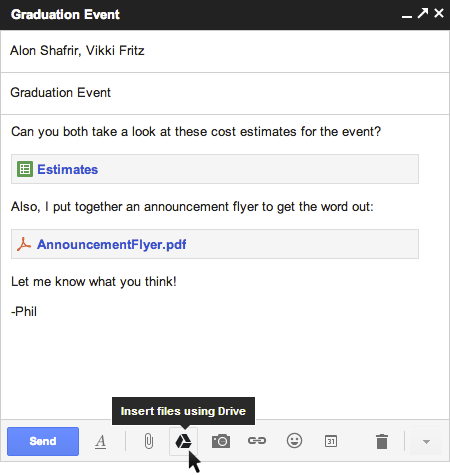
Tried sending mail attachments only to find Google complaining of size limit of the attachment? Seems Google has provided an integration feature just in time for Christmas and New Year shares. The maximum size you can now use is 10Gb, a full 400 percent than the previous size limit (which is still the case however in a traditional attachment w/o the Drive integration).

All you need to use the feature is upload your file(s) first to your Google Drive and then you will be able to attach the file(s) from within the compose of your Gmail. Not like the traditional attachment though, you will now see a new icon on your compose box, as in the screen capture below:
Gmail Attachments from Google Drive
The icon of the Google Drive is a new one below the compose box. Any big fat files (not more than 10Gb) that you need to attach (like videos, pics, excel for that matter) will need to come from Google Drive. This is yet another product integration that we see from the search giant.

Besides being able to share the large files, Google has done it well specially when it comes to the permissions on the files that you may be sharing. If you happen to attach a file which as per the permissions is not visible to one or more of this mail recipients, the system will be making it sure you know it so you could either change the permissions on the file or change your To list in the current mail.
Permissions on Google Drive Files
The feature that was announced this Tuesday is still rolling out and is available with Gmail's new compose system that Google introduced some time back.

Tuesday, 27 November 2012

Play Store Inside Google Plus

If you think Google was over and done with its product integration strategy that it has into lately, you were obviously wrong. Google+ has been the main talking point in the company apart from Android, search, panda and penguin and.. OK you got the point ;) . So the new thing or the integration rather, that the search giant have come up with this time around with their social network is the making it easy for its users to install the apps from the Play Store.

If you have been an Android user for some time now, you must have notice that you could directly install any app from the web version of the Play Store to your Android device (of course the app has to be compatible with your device) while you are logged in to Play Store on the web version. The app gets installed to your device (your device obviously needs to be connected to internet) and all this without you getting to touch your device at all. 

Cool? Yes we think so too. But now Google has integrated the Play Store inside Google plus as well. From a shared post about any app on Play Store you will now be able to install the app directly from within the post. Here is a screen capture about the look of the shared post:
Play Store Inside Google Plus
You still, however, will need to head over to Play Store to check out the ratings/reviews about the app if you are not sure of them already. For a app that is very popular or you already know about it, this feature integration is sure to save a few clicks and seconds for you. Enjoy the small yet beneficial feature integration from the search giants.


If you want to share some news with us or want us to write about it let us know. Click here

X